
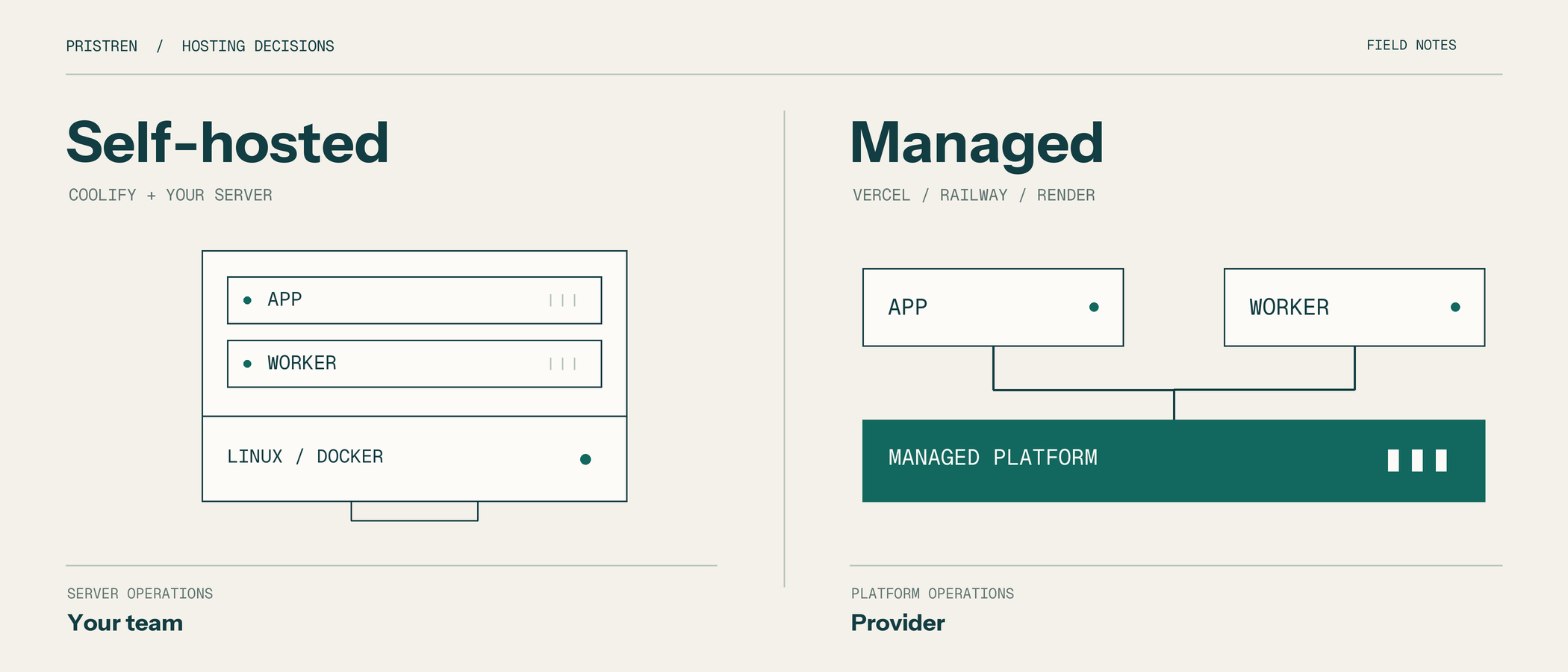
Choose Coolify when you need control over your servers and have someone who can maintain them. Choose managed hosting when your team needs to spend less time operating infrastructure. For a Coolify vs Vercel vs Railway decision, start with the app parts, the full monthly cost, and the person who will handle a failed deployment or database restore.
A cheap server can become expensive after an afternoon of repairs. A convenient platform can become expensive when one busy worker runs continuously. Neither observation settles the decision. You need to know which cost belongs to your app.
This comparison uses official documentation checked on November 10, 2026. The worked example is illustrative. We have not run a provider benchmark or measured customer savings.
Coolify vs Vercel vs Railway: what are you buying?
A VPS provider rents you a server. Coolify provides a deployment layer on infrastructure you supply. Vercel and Railway provide managed app platforms. Render is another managed option considered here, particularly for workers and persistent services.
These products overlap, but their operating boundaries differ. Ask what happens after the deployment succeeds: who patches the host, notices a full disk, restores lost data, and provides capacity during a spike?
Also separate the app from its data. You can run app containers on your own server while paying another provider to operate PostgreSQL. You can keep a frontend on Vercel and run a queue consumer elsewhere. Each boundary adds networking and operational work, so split parts for a reason you can name.
For a broader comparison of adjacent platforms, see our Coolify, Fly.io and Render comparison.
Start with a workload you can describe
Consider a two-person team building a reporting product. Customers upload CSV files, view dashboards, and request PDF exports. The app has five parts:
- A Next.js frontend with authenticated dashboards.
- An API that accepts uploads and creates report jobs.
- PostgreSQL for customers, permissions, and report status.
- A queue and worker that produce PDFs.
- Object storage for uploads and finished reports.
Assume most users are in one region. Reports can take several minutes, and jobs arrive unevenly during office hours. These are example needs, not measurements from an existing customer.
The first architectural decision is to keep report generation outside the browser request. The API records a job and returns its identifier. A worker processes it, uploads the result, and updates the database. The browser polls for completion or receives a notification.
Now the hosting questions become specific. Can the worker include its PDF dependencies? What happens when it restarts halfway through a job? Where do files survive a deployment? How many database connections can the app open? Our database connection pooling guide covers that last issue in more detail.
When Coolify is a sensible choice
Coolify fits this example if a team member already operates Linux servers and wants to control the deployment environment. The team might run the web app and worker on a VPS, with a managed database and object storage elsewhere.
The attraction is concrete: control over host selection, capacity allocation, and the software running beside the app. Several small, steady workloads may also share the same infrastructure efficiently.
That setup still needs a capacity budget. A report worker can consume memory while a deployment builds the frontend. If both compete with a database on one server, a routine release can become an outage.
Coolify documents a minimum of two CPU cores, 2 GB of RAM, and 10 GB of disk for its own installation. Your workloads need additional resources. Treat the installation requirements as a starting condition, then size the server for builds, runtime use, and headroom.
Coolify Cloud still leaves servers with you
Coolify Cloud hosts and maintains the control plane. Your apps remain on servers you connect. You still handle operating system maintenance, server security, and workload backups. The shared responsibility documentation explains the division.
Cloud can remove the work of maintaining the deployment dashboard itself. It does not remove the need for someone to investigate a failed host or restore app data.
Name the operator before choosing the server
For our reporting product, write down who handles updates, disk alerts, certificate problems, backups, and incidents outside office hours. Make sure another person can find the credentials and recovery instructions.
If the answer is always the founder, include that founder's time in the comparison. Self-hosting may still be worth it. The decision is stronger when the work has an owner and a budget.
When Vercel is a better starting point
For a small team shipping a Next.js product, start by checking whether Vercel covers the required frontend, API, and worker behavior. Keeping compatible parts together can reduce the number of deployment paths the team maintains.
Commercial projects need an eligible plan. Vercel's Hobby documentation restricts that plan to personal, non-commercial use. A commercial SaaS estimate should not assume its free allowance applies.
Inspect the Functions limits for the runtime you intend to deploy. Dependency size, request duration, memory, and regional placement can matter more than the headline plan price.
Check today's worker options
Vercel now documents multiple frontend and backend services within one project, including container setup through Services, currently in beta.
It also documents continuous container workers through Daemons, in public beta. At the research date, Daemons support production deployments with manual instance counts and ephemeral storage. Preview deployments, autoscaling, and persistent storage are unsupported in that beta.
For the reporting product, that could suit a worker that reads jobs from a queue and writes finished files to external storage. The team must accept the beta's limits and verify the required dependencies. A worker that needs a durable local filesystem requires a different design or deployment option.
Keep function limits and daemon limits separate. A restriction on one execution model does not describe the entire platform.
When Railway or Render deserves a closer look
Evaluate Railway when you want to deploy the app as several services and compare their resource use together. List the web process, API, worker, database, queue, and storage separately before estimating the bill.
Railway's plan documentation lists Hobby at $5 monthly and Pro at $20 monthly, with the base subscription contributing toward usage. Those prices are not complete quotes for our reporting product. Estimate the actual resources and account for included usage once.
Persistent volumes change deployment behavior
Railway's volume reference documents persistent storage, backup support, and important constraints. Volume-backed services cannot use replicas, and redeploying them involves a small interruption. Check those conditions before storing app state locally.
Render offers continuous background workers that poll a queue. This maps directly to a report worker that waits for jobs and processes them outside the request path.
Its persistent disks attach to one service instance, prevent that service from scaling to multiple instances, and prevent zero-downtime deployments. For a custom database, Render advises database-native backups rather than relying on a disk restore.
For our example, object storage lets report files survive worker replacement without tying the worker to a local disk. That is an architectural recommendation, not a claim that every app should avoid volumes.
Worked example: three deployment plans
Use the same reporting app to compare three plausible setups. Keep the database size, region, report volume, and recovery targets equivalent when collecting estimates.
Plan A: keep deployment managed
Run the web app and compatible API on Vercel. Evaluate its worker options against the report process, or place the worker on Railway or Render. Use external durable storage for files and a database service whose recovery terms meet the product's needs.
This suits a team with little server experience. The tradeoff is paying for the relevant services and learning their limits. If the worker lives elsewhere, document how it authenticates to the queue, database, and storage.
Plan B: operate compute with Coolify
Run the app and worker through Coolify on a VPS. Keep the database and report files in separate services if the team wants to reduce the data recovery work it owns.
Set worker concurrency deliberately. For example, allowing one report at a time can protect memory while you measure usage. It also increases waiting time during a burst. Raise concurrency only after observing the workload.
This plan gives the team control over its compute budget. It also makes host maintenance, capacity planning, and incident response part of product operations.
Plan C: move only the bottleneck
Keep a working frontend deployment and move the report worker if measurements show a clear benefit. Compare the worker's bill and resource needs before migrating anything else.
Place it near the database where possible. Avoid repeatedly downloading large inputs across providers. Carry a job identifier through API logs, queue messages, worker logs, and database records so failures can be traced.
Choose this plan when the worker has a specific requirement that the existing setup handles poorly. Keeping the rest stable reduces the scope of the migration.
Compare costs without hiding the labour
Suppose the managed setup is estimated at $120 monthly. Suppose the alternative costs $45 for compute, backups, and monitoring. These are invented planning figures, not current provider quotes, and assume the other services cost the same in both setups.
The apparent saving is $75. At an internal labour cost of $30 per hour, 2.5 additional operating hours consume it. If self-hosting adds four hours monthly, its comparable cost becomes $165. If it adds one hour, the cost becomes $75.
The calculation does not predict your maintenance time. It shows why that estimate belongs beside the infrastructure price.
Include transfer, database storage, backup retention, observability, build resources, support, and any additional seats. Compare the same billing period. Some bills rise with usage; a fixed server bill can instead hide the cost of unused capacity or emergency upgrades.
Traffic alone is a poor shortcut. Ten thousand cached page visits and ten thousand PDF jobs can create very different workloads. Measure requests, active CPU, memory, transferred bytes, and job duration before deciding that a visitor threshold makes migration worthwhile.
Test the failure that would hurt your business
For the reporting product, start with an interrupted job. Stop the worker halfway through generating a report in a non-production environment. Restart it and check whether the job completes, retries safely, or becomes stuck.
Use a stable job identifier and make repeated processing safe. A retry should not charge twice, send duplicate completion messages, or overwrite another customer's report. Persist the final status only after the output is stored successfully.
Then test a deployment while reports are queued. Check that the old worker stops accepting work, handles shutdown, and leaves interrupted jobs recoverable. These are app needs on every hosting setup.
Restore data into a separate environment
Agree how much data loss is acceptable and how long recovery may take. Then restore a backup into a separate environment and verify that the app can use it.
Check accounts, permissions, recent report records, and file references. A successful database import can still leave missing files or incompatible app code. Railway provides backup documentation; follow the procedure for the actual database and storage services you choose.
Record the recovery commands and access needs. Keep a copy where it remains available if the main server fails.
Test the user journey after migration
Upload a sample file, request a report, wait for completion, download it, and verify access from another account. Repeat after a deployment. Our Playwright testing guide can help turn that journey into a repeatable check.
For request validation and error handling, see our production API patterns. Hosting cannot compensate for an endpoint that accepts unsafe input or loses track of a failed job.
How to choose your hosting setup
1. Map the parts
List the web app, API, workers, database, queue, and file storage. Record runtime dependencies, durable data, regions, and connection needs for each.
2. Assign operating responsibility
Name who owns host updates, capacity, alerts, app failures, and recovery. For managed services, read the provider's boundary and identify what your team still handles.
3. Price the same workload
Collect estimates using equivalent resources and recovery needs. Add transfer, backups, monitoring, and operator time. Mark every assumption that needs measurement.
4. Run a small rehearsal
Use non-production data to test deployment, worker interruption, file persistence, and backup restoration. Record setup and versions so someone else can repeat the result.
5. Decide what should move
Choose the setup that meets the needs within your team's budget. If one part causes the problem, migrate that part first and verify the result before expanding the change.
What the report screen should show
The customer should see a report move through queued, processing, ready, or failed states. A queued report needs a timestamp and a useful explanation of what happens next. A ready report needs a download link. A failed report needs a retry route and an error reference that support can trace.
Keep this behavior consistent when you change providers. If the frontend says processing forever after a worker dies, the migration has failed from the customer's perspective even when every service dashboard looks healthy.
For a rehearsal, submit three reports, restart the worker during the second, and observe all three records. Confirm that the first remains downloadable, the interrupted job recovers, and the third eventually runs. Test an expired download link too. These checks expose the connections between compute, queue state, database records, and file storage.
Review access before connecting production
Give each part only the access it needs. The report worker may need to read uploaded files and write generated PDFs. It does not automatically need permission to administer customer accounts or change billing records.
Keep secrets out of app logs and uploaded files. Separate production credentials from rehearsal credentials. When moving a worker, review both the credentials added to the new provider and those left behind on the old one.
Document the route between services. An internal hostname from one provider may not resolve from another. A database connection that worked inside one network may require a different endpoint, access rule, or certificate setup after the move.
Before cutover, verify those settings from the replacement worker itself. Then remove obsolete access after the rollback window closes. This is particularly important for hybrid setups, where a deployment can cross several account boundaries.
Keep the decision reversible
Use managed hosting when it removes work your team cannot reasonably own. Use Coolify when server control serves a clear requirement and someone can operate the result. Keep the database managed if its recovery needs exceed the time or expertise available internally.
Before moving production, confirm how to export data, rebuild the app, change traffic routing, and return to the previous deployment. Keep the current system available through verification. Avoid overlapping writers unless the migration explicitly handles them.
The reporting team should leave this exercise with a part list, a cost estimate, a tested recovery procedure, and named owners. Those records will remain useful when prices change or the product outgrows its first deployment.
Review the decision again after measuring a full month of normal production usage.




Comments
Have a question or something to add? Sign in to join the discussion.